Demo Taylor-Green vortex (fluidsimfoam-tgv solver)#
Fluidsimfoam repository contains a simple example solver for the Taylor-Green vortex flow. We are going to show how it can be used on a very small and short simulation.
Run a simulation by executing a script#
We will run the simulation by executing the script doc/examples/scripts/tuto_tgv.py, which contains:
from fluidsimfoam_tgv import Simul

params = Simul.create_default_params()

params.output.sub_directory = "examples_fluidsimfoam/tgv"

sim = Simul(params)

sim.make.exec("run")
In normal life, we would just execute this script with something like
python tuto_tgv.py.
command = "python3 examples/scripts/tuto_tgv.py"
However, in this notebook, we need a bit more code. How we execute this command is very specific to these tutorials written as notebooks so you can just look at the output of this cell.
Show code cell source
from subprocess import run, PIPE, STDOUT
from time import perf_counter

print("Running the script tuto_tgv.py... (It can take few minutes.)")
t_start = perf_counter()
process = run(
    command.split(), check=True, text=True, stdout=PIPE,  stderr=STDOUT
)
print(f"Script executed in {perf_counter() - t_start:.2f} s")
lines = process.stdout.split("\n")
Running the script tuto_tgv.py... (It can take few minutes.)
Script executed in 21.55 s
To “load the simulation”, i.e. to recreate a simulation object, we now need to extract from the output the path of the directory of the simulation. This is also very specific to these tutorials, so you don’t need to focus on this code. In real life, we can just read the log to know where the data has been saved.
Show code cell source
path_run = None
for line in lines:
    if "path_run: " in line:
        path_run = line.split("path_run: ")[1].split(" ", 1)[0]
        break
if path_run is None:
    raise RuntimeError
path_run
'/home/docs/Sim_data/examples_fluidsimfoam/tgv/tgv_run_2023-06-27_21-21-48'
!ls {path_run}
0    0.3  constant		       logs2023-06-27_21-21-49	system
0.1  0.4  info_solver.xml	       params_simul.xml		tasks.py
0.2  0.5  log_2023-06-27_21-21-52.txt  postProcessing
Load the simulation#
We can now load the simulation and process the output.
from fluidsimfoam import load

sim = load(path_run)
pyvista is not importable so it cannot be used. You could install it (`pip install pyvista`) and retry.
path_run: /home/docs/Sim_data/examples_fluidsimfoam/tgv/tgv_run_2023-06-27_21-21-48
INFO     sim:                        <class 'fluidsimfoam_tgv.Simul'>
         sim.output.log:             <class 'fluidsimfoam.output.log.Log'>
         sim.output.fields:          <class 'fluidsimfoam.output.fields.Fields'>
         input_files:
           - in 0:          p U
           - in constant:   transportProperties turbulenceProperties
           - in system:     controlDict fvSchemes fvSolution decomposeParDict blockMeshDict
         sim.output:                 <class 'fluidsimfoam_tgv.output.OutputTGV'>
         sim.oper:                   <class 'fluidsimfoam.operators.Operators'>
         sim.init_fields:            <class 'fluidsimfoam.init_fields.InitFields'>
         sim.make:                   <class 'fluidsimfoam.make.MakeInvoke'>
Quickly start IPython and load a simulation
The command fluidsimfoam-ipy-load can be used to start a IPython session and load the
simulation saved in the current directory.
One can do many things with this Simul object. For example, a Numpy array corresponding
to the last saved time can be created with:
field_u = sim.output.fields.read_field("U")
arr_u = field_u.get_array()
arr_u.shape
(64000, 3)
x, y, z = sim.oper.get_cells_coords()
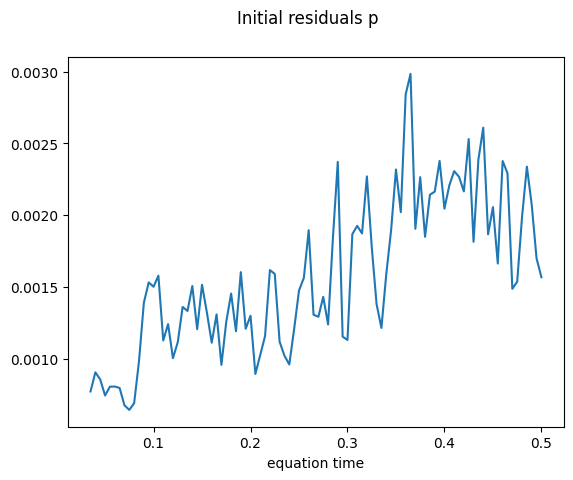
Data saved in the OpenFOAM log file can be loaded and plotted with the object
sim.output.log, an instance of the class fluidsimfoam.output.log.Log:
sim.output.log.plot_residuals(tmin=0.03);
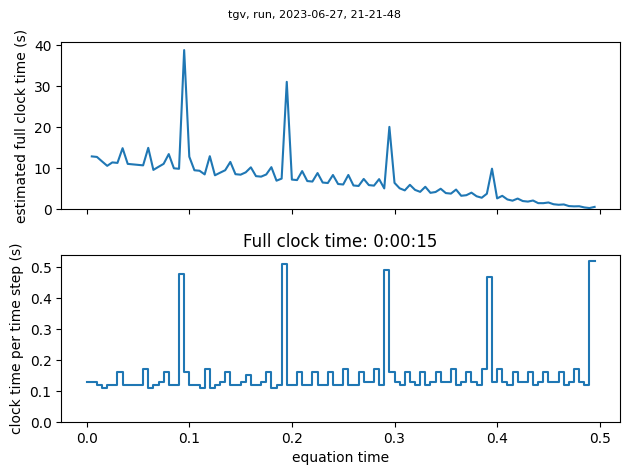
To know how long should run a simulation, one can use:
sim.output.log.plot_clock_times()
Mean clock time per time step: 0.152 s